Day 5
This is the day 5 page for object oriented programming course 102, an introduction to object oriented programming. On day 5 we're going to write a class.Below are the topics and course materials we are learning today.
Writing a file search class
In today's lesson we are going to write a class to support for files search application. This application will search your computer for files matching their name and contents, and display the results to the user in a friendly grid. To accomplish this goal we will be designing a file search class.Gathering requirements
Before we start writing out application and our class to implement our search algorithm, we should take a moment to write down the requirements of our application. Ask yourself what information would be needed to create a search for files.Useful file searching routines
Here are a few useful routines to help you get started writing a file searching class.The first routine is named FindFiles, and it will help you by searching for files and folders on your computer.
type
  TOnFindFile = procedure(Folder: string; FileName: string; var Continue: Boolean) of object;

procedure FindFiles(const Folder: string; Pattern: string; Recursive: Boolean; OnFindFile: TOnFindFile);
var
  S: TSearchRec;
  F, P: string;
  C: Boolean;
begin
  if not Assigned(OnFindFile) then
    Exit;
  F :=  Trim(Folder);
  if F = '' then
    F := GetUserDir;
  F := IncludeTrailingPathDelimiter(F);
  P := Trim(Pattern);
  if P = '' then
    P := '*';
  C := True;
  if FindFirst(F + P, faAnyFile or faHidden{%H-}, S) = 0 then
  try
    repeat
      if S.Attr and faDirectory = 0 then
        OnFindFile(F, S.Name, C);
      if not C then
        Exit;
    until FindNext(S) <> 0;
  finally
    FindClose(S);
  end;
  if Recursive then
    if FindFirst (F + '*', faDirectory or faHidden{%H-}, S) = 0 then
    try
      repeat
        FindFiles(F + S.Name, P, Recursive, OnFindFile);
      until FindNext(S) <> 0;
    finally
      FindClose(S);
    end;
end;
The second routine is named FindInFile, and it will assist you bin search the contents of a single file. It returns an Integer denoting the number of times a text pattern is found inside a file.
function FindInFile(const FileName: string; const Pattern: string;
  CaseSensitive: Boolean; Buffer: PChar; BufferSize: Integer): Integer;
var
  Stream: TFileStream;
  S: string;
  P: PChar;
  B, I, J: Integer;
begin
  Result := 0;
  if not FileExists(FileName) then
    Exit;
  if Pattern = '' then
    Exit;
  if Buffer = nil then
    Exit;
  if BufferSize < 1 then
    Exit;
  if CaseSensitive then
    S := Pattern
  else
    S := UpperCase(Pattern);
  Stream := nil;
  try
    Stream := TFileStream.Create(FileName, fmOpenRead);
    B := Stream.Read(Buffer^, BufferSize);
    I := 1;
    while B > 0 do
    begin
      P := Buffer;
      for J := 0 to B - 1 do
      begin
        if CaseSensitive then
        begin
          if P[J] = S[I] then
            Inc(I)
          else
            I := 1;
        end
        else
        begin
          if UpCase(P[J]) = S[I] then
            Inc(I)
          else
            I := 1;
        end;
        if S[I] = #0 then
        begin
          I := 1;
          Inc(Result);
        end;
      end;
      B := Stream.Read(Buffer^, BufferSize);
    end;
    Stream.Free;
  except
    Stream.Free;
    Result := 0;
  end;
end;
Homework
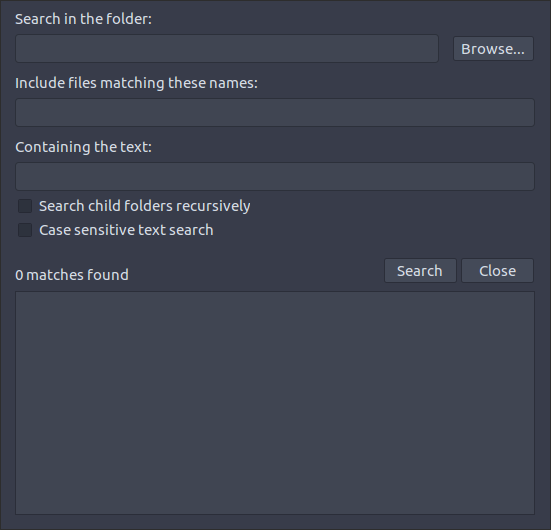
This day your homework is to create a design of a search application to match the layout below. Use the Lazarus form editor to replicate the form design below. In our next lesson we will use your design to complete the file search application with the file search class we created in this lesson.